
Google Creative Lab has released Gemma Translator, an open-source project that demonstrates how to build a fully local voice translator around a Raspberry Pi 5. Its architecture combines Gemma 4 E2B, LiteRT-LM, local speech recognition and synthesis, and a React interface to handle the entire workflow without relying on a cloud API once the models have been downloaded. Alongside the source code, the repository includes deployment scripts and STL files for 3D-printing the enclosure.
Gemma Translator in 20 seconds
- It runs Gemma 4 E2B locally through LiteRT-LM on a Raspberry Pi 5 with 8 GB of RAM.
- Moonshine handles transcription, while
moonshine-voicegenerates the spoken response. - The backend is written in Python and the interface uses React and Vite.
- It can operate completely offline after the dependencies and models have been installed.
- The project includes deployment scripts, a systemd service, and STL files to build the physical device.
More than the translator itself, Gemma Translator is particularly interesting as a reference project for developers experimenting with LLMs at the edge. It demonstrates a relatively straightforward architecture for chaining audio capture, speech-to-text (STT), generative model inference, and text-to-speech (TTS) without requiring the data to leave the device.
It is also worth separating the actual project from some of the descriptions circulating around it. Gemma Translator is not a new commercial Google product, and there is currently no device announced for retail sale. The repository itself states that this is an experimental project without official Google product support.
How Gemma Translator Works Under the Hood
The architecture can be divided into four main components:
- Moonshine STT receives microphone audio and converts it into text.
- Gemma 4 E2B receives the transcription and performs the translation.
- moonshine-voice TTS converts the translated text back into speech.
- An interface built with React and Vite manages interaction between the two users.
The backend uses Python and acts as an intermediary between the interface and the local LiteRT-LM server.
The repository launches three main components: LiteRT-LM listens on port 9379 by default, the backend provides the API, and the frontend can run through Vite during development. In production, the backend itself serves the compiled frontend assets on port 3000.
The project structure reflects this separation:
gemma-translator/
├── frontend/       # React + Vite
├── backend/        # Python API
├── deploy/         # systemd service
├── stl/            # 3D-printable enclosure
├── setup.sh
├── download_model.sh
├── start.sh
└── deploy-pi.shCode language: PHP (php)
This makes the repository useful for more than simply reproducing the original project. A developer could keep Gemma while replacing the interface, swap out the voice components, or adapt the same architecture to build a completely different local AI device.
LiteRT-LM Is Probably the Most Interesting Part
The translator uses gemma4-e2b, a compact variant of Gemma 4 prepared to run through LiteRT-LM.
LiteRT-LM is part of Google AI Edge and is designed to run generative models locally across different platforms, including Android, iOS, desktop systems, and Raspberry Pi.
For this project, it performs a fundamental role: it makes it possible to run the model on hardware far more constrained than a conventional GPU server.
The preparation process is automated. After cloning the repository, the included scripts can create the environment and install the required dependencies:
chmod +x setup.sh download_model.sh start.sh deploy-pi.sh
./setup.sh
The model can then be downloaded:
./download_model.shThis script retrieves gemma4-e2b and prepares it for LiteRT-LM.
That step does require an Internet connection. The project’s offline capability refers to what happens afterwards: once the models and dependencies are installed locally, translations do not need to call an external API.
That is an important distinction for developers evaluating an edge AI architecture.
Offline does not mean that the device somehow arrives configured without ever connecting to the Internet. It means the application’s runtime does not depend on connectivity.
From Cloning the Repository to an AI Appliance
During development, the entire application can be launched with:
./start.shThe script starts LiteRT-LM, the Python backend, and the Vite development server.
The frontend becomes available at:
http://localhost:5173Code language: JavaScript (javascript)while LiteRT-LM uses:
http://localhost:9379Code language: JavaScript (javascript)There is also a production mode:
./start.sh --prodIn this configuration, the Vite development server is skipped and the backend directly serves the compiled assets from frontend/dist/.
The application is then available on port 3000.
Google Creative Lab has gone a step further for hardware projects by including a way to turn the setup into an appliance that starts automatically.
On Raspberry Pi, developers can use:
./deploy-pi.shThe script installs the required packages on Raspberry Pi OS or Debian, prepares the Python environment, builds the React application, downloads the model, and registers a systemd service.
It also configures LXDE to automatically launch Chromium in kiosk mode pointing to:
http://localhost:3000Code language: JavaScript (javascript)The result is similar to the architecture used by many commercial Linux-based devices: the operating system effectively disappears behind an application that launches automatically when the hardware boots.
A Raspberry Pi 5 With 8 GB as an Inference Server
The reference hardware is not particularly exotic.
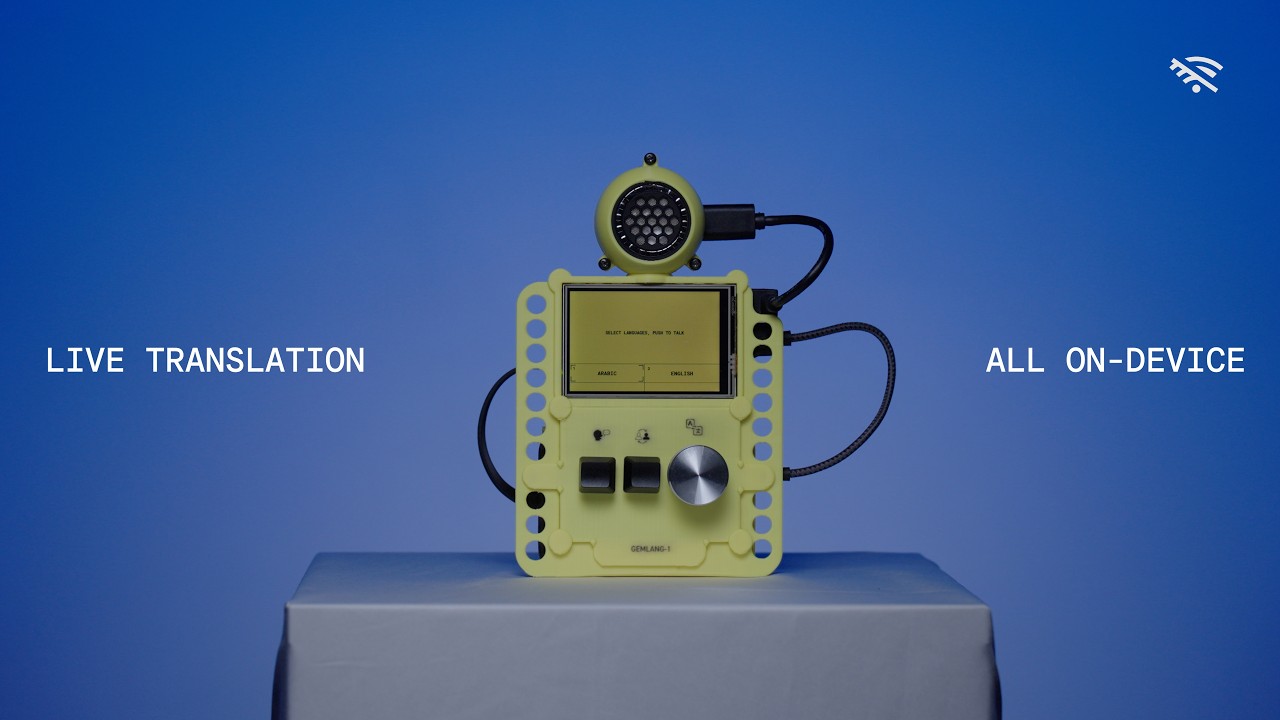
The repository specifies a Raspberry Pi 5 with 8 GB of RAM, together with:
- a microphone or USB audio capture interface;
- a speaker or headphone output;
- a display or touchscreen;
- storage for the operating system and models;
- a power supply or battery for portable use.
The interface has been designed specifically for small displays, with 480 × 320 pixels given as one of the reference resolutions.
Google also provides STL files for printing the enclosure.
This does not mean there is a single mandatory bill of materials. The project is closer to a reference implementation than a commercial kit with a certified list of components.
For developers, it may actually make more sense to run the software on Linux or macOS first before purchasing or printing any hardware.
Two Interfaces for a Two-Person Conversation
The application is designed around two speakers.
Each person gets their own area, or lane, with an assigned language. When one person speaks, the system captures the audio, transcribes it, sends the text to Gemma, and plays the translated result in the other person’s language.
There are two keyboard control schemes.
In landscape mode, one person is active at a time. The spacebar switches between speakers, Z works as a push-to-talk button, and the left and right arrow keys change the language.
In vertical mode, each person gets independent controls.
The selected configuration is stored in localStorage under:
keyboardModeso the setting persists between device restarts.
There is one detail that may seem surprising for a device equipped with a touchscreen: the current implementation uses keyboard controls to start recording and switch languages. The repository explicitly states that on-screen touch controls are not currently enabled for these functions.
That is another reminder that this is experimental code rather than a finished consumer product.
The Entire Pipeline Can Stay on the Device
The main architectural advantage becomes clear when following a conversation through the system:
Microphone
   ↓
Moonshine STT
   ↓
Text
   ↓
Gemma 4 E2B + LiteRT-LM
   ↓
Translation
   ↓
moonshine-voice TTS
   ↓
Speaker
Everything can happen on the Raspberry Pi.
There is no need to first send audio to a cloud speech-recognition service, then send the resulting text to an LLM API, and finally send the translation to another API for speech synthesis.
This reduces external dependencies and eliminates the variable cost associated with API calls.
It also makes this architecture suitable for applications in places where connectivity is unavailable, expensive, or unreliable: vehicles, industrial facilities, rural areas, boats, or devices intended for travel.
From a privacy perspective, there is another clear advantage: the design allows audio and transcriptions to remain on hardware controlled by the user.
That does not automatically make the device secure. A compromised Raspberry Pi, modified software, or incorrect configuration could still expose information. But the architecture removes the requirement to transmit every conversation to an external provider.
Edge AI Changes Some Architecture Decisions
Gemma Translator also illustrates a question that is becoming increasingly relevant for developers: when is it better to use an API, and when does running the model locally make more sense?
Cloud infrastructure still offers major advantages.
It enables access to much larger models, provides resources that can scale on demand, allows centralized updates, and avoids having to manage compute capacity on every individual device.
Edge computing offers a different set of properties.
| AI via API | On-device AI |
|---|---|
| Larger models | Compact models |
| Requires connectivity | Can work offline |
| Centralized scaling | Resources limited by device |
| Centralized updates | Models must be distributed |
| Usage-based costs | Cost mainly concentrated in hardware |
| Data sent to provider | Data can remain local |
| Latency depends on network | Inference happens close to user |
There is no universal winner.
An enterprise chatbot querying huge document repositories will probably continue to benefit from cloud infrastructure. A portable translator processing relatively short sentences has very different requirements.
In that scenario, a small model may be sufficient, while privacy, latency, and offline operation become more important.
It Also Shows Where Google Wants to Take Gemma
There is another way to look at the project.
Google is not developing Gemma exclusively as a family of models for workstations and servers. LiteRT-LM demonstrates its interest in bringing generative models to mobile and edge devices.
Gemma 4 E2B fits directly into that strategy.
The availability of sufficiently compact models also changes the kind of applications an independent developer can build. Only a few years ago, locally running a complete pipeline combining speech recognition, LLM-based translation, and speech synthesis on a small ARM computer would have required considerably more compromises.
Now it can be assembled around a Raspberry Pi.
The next question is how far hardware requirements can be reduced. Raspberry Pi is a useful experimental platform, but smartphones, laptops, and future devices equipped with neural processing units (NPUs) offer specialized accelerators capable of running local models with potentially better performance per watt.
Gemma Translator does not have to remain a translator either.
Its architecture could be adapted into a private voice assistant, an interface for industrial machinery, an offline customer-service terminal, an educational tool, or specialized applications where conversations should remain inside a local network.
That is probably the most interesting part for developers. The repository does not simply provide plans for a gadget; it offers a practical example of how to package a small generative model into a standalone device, covering everything from inference and backend services to systemd, Chromium kiosk mode, and a 3D-printable enclosure.
Frequently Asked Questions
What model does Gemma Translator use?
The project uses gemma4-e2b, a compact Gemma 4 model running locally through LiteRT-LM.
Can Gemma Translator run without a Raspberry Pi?
The repository supports Linux and macOS for development, while deploy-pi.sh is designed to turn a Raspberry Pi 5 into the complete appliance. The documented hardware configuration uses a Raspberry Pi 5 with 8 GB of RAM.
Does it need a Google API to translate?
Not during normal operation. Once the model and dependencies have been downloaded, Gemma 4 runs locally through LiteRT-LM and does not need to send each translation to a cloud service.
Is Gemma Translator an official Google product?
No. It was developed by a small Google Creative Lab team and published within the Google Gemma ecosystem, but the repository explicitly states that it is not an officially supported Google product.