
Running a PowerShell command copied from the Internet without reviewing the code should worry people more than it does. In the Windows world, it has become far too normal to open an administrator console, paste a one-liner with iex pointing to an external server, and simply trust that everything will be fine. Sometimes the tool is well known, sometimes the repository looks reliable, and very often the user just wants to clean up the system as quickly as possible.
The problem is that this convenience comes at a cost. When a script modifies services, policies, scheduled tasks, telemetry, system packages, network settings or security components, it is no longer a minor utility. It is touching sensitive parts of the operating system. For a home user, it may be a quick way to remove bloatware. For a system administrator, developer or anyone preparing local compute nodes, running tools without reading them is a bad habit that eventually creates trouble.
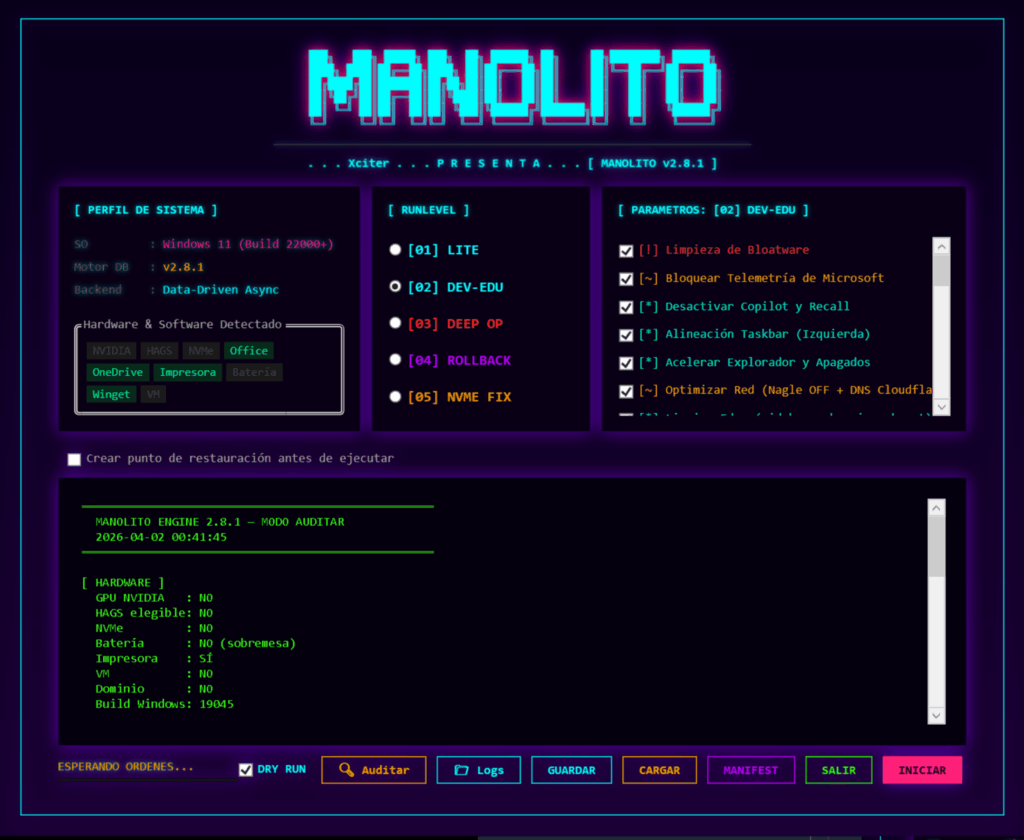
This is the context in which Manolito 2.8.1 appears. The project presents itself as a modular and unattended optimizer for Windows 11 Pro, Enterprise and Education. Its approach moves away from the typical monolithic script with a huge menu of generic options and instead uses a data-driven architecture, where payloads and validation are decoupled from the core logic through a manolito.json file.
Less Swiss Army knife, more controlled intervention
Tools such as Chris Titus Tech’s utility have become popular because they solve many problems at once: app installation, quick tweaks, cleanup, configuration changes and a simple interface for users who do not want to go into detail. They make sense in some scenarios. The problem appears when they are used in the same way on a personal laptop, a development workstation, a corporate device or a machine intended to run local AI workloads.
Not every system needs the same treatment. An optimizer packed with features may end up applying changes that are too broad, installing utilities that were never requested or touching components that a company actually needs to keep. In system administration, less can be more if the goal is to know exactly what is being changed, why it is being changed and whether it can be reversed.
Manolito tries to occupy that space. According to the project documentation, it has evolved from a cleanup script into a declarative provisioning framework based on Zero Trust principles. The wording may sound ambitious, but the practical idea is clear: separate configuration, payloads and engine; make auditing easier; provide runlevels; detect specific hardware; and capture a technical snapshot of the machine before applying changes to enable rollback.
Version 2.8.1 includes an asynchronous WPF interface built on native runspaces and ConcurrentQueue, so the UI does not freeze while heavy tasks run in the background. It also includes real-time WMI auditing to detect elements such as NVMe drives, NVIDIA GPUs, batteries or virtual machines, and automatically block incompatible payloads.
| Manolito 2.8.1 component | What it provides |
|---|---|
manolito.json-driven engine | Decoupled payloads and logic |
| Asynchronous WPF UI | Background execution without freezing the interface |
| WMI auditing | Hardware detection and blocking of incompatible tweaks |
| Runlevels | LITE, DEV-EDU, DEEP OP, ROLLBACK and NVME FIX modes |
| Manifest Time-Machine | Technical snapshot before changes for rollback |
| Focus | Telemetry, bloatware, cloud identity and performance tuning |
| Target platform | Windows 11 Build 22000 – 26200+ |
| Framework | PowerShell 5.1 |
What it touches and why that matters
Manolito does not present itself as a neutral tool. Its documentation makes clear that its goal is to reduce telemetry, remove bloatware, limit unwanted components and tune the system for better performance and lower resource usage. The project mentions protection against Microsoft telemetry, cloud identity, KMS remnants and bloatware components.
Those changes can be useful in specific scenarios. A lab machine, an old laptop, a low-resource system or a local inference node can benefit from fewer background processes, widgets, unnecessary services and telemetry layers. On machines with 2 GB or 4 GB of RAM, every resident process matters.
The project documentation claims that Manolito can run Windows 11 with drastically reduced resources, including a “RAM Challenge” on machines with 2 GB of RAM, base memory usage down to 1.4 GB and idle CPU stabilised between 0% and 7%. These are project-provided figures and should be treated as lab or specific-case results, not as a universal guarantee. Real performance will depend on hardware, Windows edition, drivers, installed services, updates and later usage.
The interesting point is not the promise of miracles, but the philosophy of fine-tuning. Manolito organises execution by levels. LITE focuses on essential bloatware and basic telemetry. DEV-EDU targets networking, advertising and KMS cleanup. DEEP OP goes into more sensitive tuning, such as input latency, MSI mode on GPU/NVMe and disabling VBS. ROLLBACK allows granular reversal. NVME FIX applies specific tuning for solid-state storage when physical NVMe hardware is detected.
This separation matters because not all tweaks carry the same risk. Removing a preinstalled app is not the same as modifying VBS, touching NVMe write cache or adjusting network services. A serious optimizer should make clear which level of intervention is being applied and what impact it may have.
Transparency should be a requirement, not decoration
The most relevant part for administrators and developers is not that Manolito has a flashy interface. It is that the project allows users to review the code and payloads before running them. In Windows environments, where many tools are distributed as long and poorly documented scripts, this transparency is a practical advantage.
That does not mean it should be trusted blindly. Quite the opposite. Any script requiring administrator privileges should always be audited. The .ps1 should be read, the manolito.json should be reviewed, and users should understand which registry keys it modifies, which services it disables, which tasks it touches, which packages it removes and which changes are reversible. Trust should not come from the name of the project, but from the ability to verify what it does.
The licence also matters. Manolito Engine is distributed as free software under GNU GPLv3 for personal and educational use, but the README itself warns that corporate use or use by MSPs for profit requires a commercial licence to be exempt from GPLv3 copyleft obligations. This point is important for companies that may want to include it in internal processes, base images or support services.
In professional environments, any optimization should also be tested first on lab machines. It is not enough for the script to work on the author’s PC or on a home machine. It has to be validated against real images, domain policies, EDR solutions, VPNs, corporate software, updates, drivers, printers, virtualization tools and support requirements.
Optimizing Windows should not be an act of faith
The deeper criticism is not aimed at one tool in particular, but at a bad habit in the industry: running optimization scripts as if they were universal recipes. Windows 11 may come with many unnecessary components for certain uses, but it also includes dependencies that are not always obvious at first glance. Blind tweaks can break Windows Update, authentication, networking, search, Microsoft Store, drivers, security policies or business applications.
That is why a useful optimizer for technical users should meet several conditions: auditable code, documented changes, modular execution, rollback capability, hardware detection, separation between safe and aggressive tweaks, and no opaque dependencies. Manolito tries to cover much of that approach.
Its value lies in assuming that not every user wants a Swiss Army knife full of buttons. Some want a scalpel: fewer decorative features, more control, less blind automation and a better chance of understanding what happens inside the system.
That does not make it a tool for everyone. Precisely because it can modify sensitive parts of Windows, Manolito should be used with technical judgement. For inexperienced users, a powerful optimizer can be as dangerous as the problem it tries to solve. For administrators, developers and advanced users, it can be an interesting base if it is reviewed, tested and adapted to the environment.
The lesson is simple. Optimizing Windows should not mean pasting a command found on social media. It should mean knowing what is unnecessary, what is being changed, what must be preserved and how to go back if something fails. Manolito 2.8.1 points in that direction: less faith in remote scripts and more control over the system.
Frequently asked questions
What is Manolito 2.8.1?
Manolito 2.8.1 is a modular optimizer for Windows 11 Pro, Enterprise and Education based on PowerShell, with a WPF interface, runlevels and a manolito.json-driven engine.
How is it different from other Windows optimization scripts?
Its documentation highlights a data-driven architecture, WMI auditing, asynchronous execution, differentiated runlevels and rollback through a previous technical manifest.
Should it be run without reviewing the code?
No. Any tool that requires administrator privileges and modifies services, registry keys or system policies should be reviewed first and tested in a controlled environment.
Can it be used in companies?
The README states that the project is licensed under GPLv3 for personal and educational use, and that corporate use or use by MSPs for profit requires a commercial licence.
Sources: