
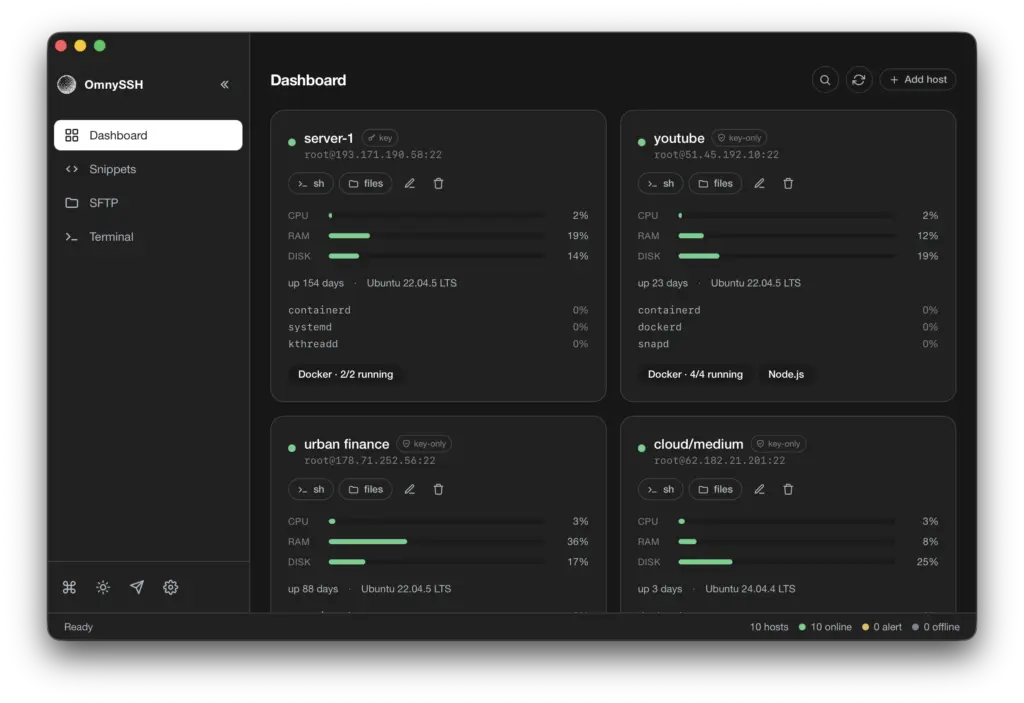
OmnySSH is an open-source SSH client and server manager, written in Rust and released under the Apache 2.0 licence, that brings together connections to every server, a dashboard with their CPU, memory and disk usage, tabbed terminals, a two-pane SFTP file manager and a library of reusable commands. It runs on macOS, Windows and Linux, as a desktop app or a terminal program, and according to its author it requires no account and sends no telemetry.
OmnySSH key facts in 20 seconds
- Free SSH manager in Rust with a GUI and a terminal version.
- Shows CPU, RAM, disk, top processes and containers for each server.
- Includes two-pane SFTP and commands broadcast to several hosts.
- Sets up Ed25519 keys and disables password login in one flow.
The project, maintained by developer Tim Hartmann on GitHub, had passed 1,200 stars by early November 2026. The idea is straightforward. Anyone looking after several VPS usually juggles one terminal per server, a separate SFTP client and some monitoring panel. OmnySSH tries to fit all of that into a single app that reads the existing ~/.ssh/config, including hosts reached through a bastion with ProxyJump.
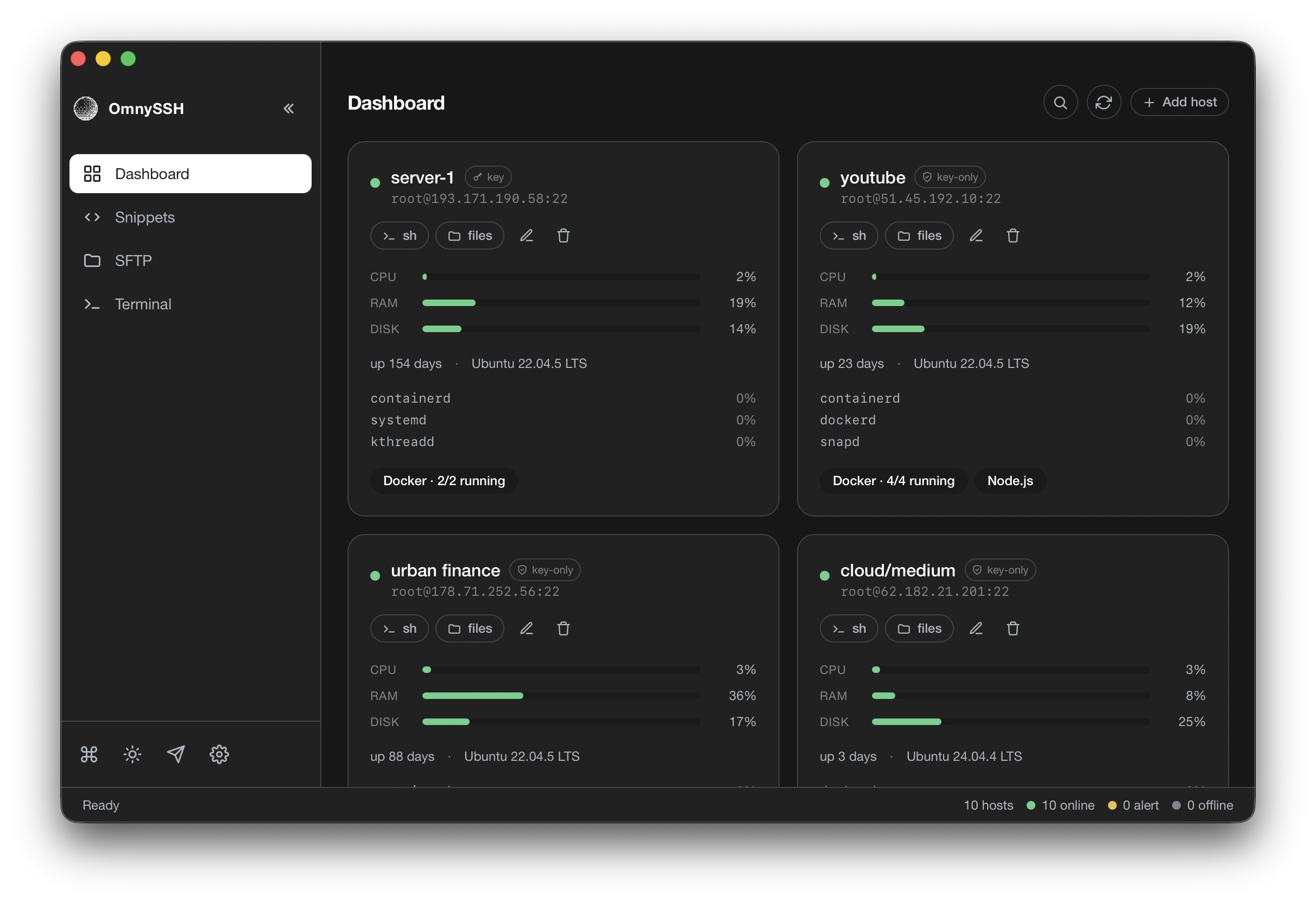
What it does: dashboard, terminals, SFTP and snippets
Every server you add becomes a card with CPU, RAM and disk bars, uptime, OS version, the processes using the most CPU and a badge with the number of running Docker containers. Bars turn yellow and then red as a resource fills up, and the grid can be grouped by tag and sorted. Data refreshes on its own.
From each card, one click opens a real PTY terminal in a tab and another opens the SFTP browser, with the local machine on the left and the server on the right. Files can be dragged between panes or straight from the system file manager. Snippets store the commands you paste every week and accept parameters: sudo systemctl restart {{service}} asks for the service name before running, and the same command can be sent to several selected hosts at once.
The rest of the package includes a global ⌘K search across hosts and open sessions, light and dark themes, and a streamer mode that swaps real IP addresses for fake ones so you can record demos or share your screen without exposing a client’s infrastructure. The author says the app uses around 130 MB of RAM with several sessions open, against 649 MB he measured for an idle Termius on an M4 Mac. That is the project’s own comparison, not an independent benchmark.
Installing it on macOS, Linux and Windows
The quickest route is the official script, which detects the OS and architecture and installs the desktop build. --tui installs the terminal app instead and --both installs both. As with any script piped into sh, it is worth reading it in the repository first:
curl -fsSL https://raw.githubusercontent.com/timhartmann7/omnyssh/main/install.sh | sh

# Terminal version only, or both
curl -fsSL https://raw.githubusercontent.com/timhartmann7/omnyssh/main/install.sh | sh -s -- --tui
curl -fsSL https://raw.githubusercontent.com/timhartmann7/omnyssh/main/install.sh | sh -s -- --bothCode language: PHP (php)
The releases page offers .dmg files for Apple Silicon and Intel Macs, .AppImage, .deb and .rpm packages for Linux x86_64 and an .exe installer for Windows. The terminal version, launched with the omny command, can also be installed with Cargo, Homebrew or Nix:
cargo install omnyssh
brew install timhartmann7/tap/omnyssh
nix run github:timhartmann7/omnyssh

omny     # a: add host, /: search, g: group by tag, ?: helpCode language: PHP (php)
The TUI shares its engine with the GUI (the repository is a Cargo workspace with a common core), ships four themes and supports remapped keys in config.toml. Configuration lives in ~/.config/omnyssh/ on Linux, ~/Library/Application Support/omnyssh/ on macOS and %APPDATA%omnyssh on Windows. ~/.ssh/config is read at startup and never written to.
One-click SSH keys, with care
The most sensitive feature is automatic key setup. On a host you added yourself with no key configured, the Set up SSH key button (or Shift+K in the TUI) generates an Ed25519 key, appends the public half to authorized_keys, switches the host to key authentication, opens a fresh connection to prove the key works and only then turns password login off. Before touching sshd_config it saves a backup on the server and restores it if any step fails.
The documentation warns that there is no confirmation step in between: starting the flow means going through with it. The author himself suggests reading key_setup.rs before pointing it at production, and it is sensible to keep an alternative way in, such as the provider’s console, in case something goes wrong. The private key never leaves your machine, and passphrases are kept in memory only until the app is closed.
The docs list two known issues. On macOS, hosts on the local network may fail with “No route to host” until the app is allowed under System Settings, Privacy & Security, Local Network. On a Synology NAS, DSM only grants a shell to members of the administrators group with the SSH service enabled. If you prefer standalone utilities, we also covered 12 modern tools for the Linux terminal.
Frequently asked questions
Is OmnySSH free?
Yes. It is open-source software under the Apache 2.0 licence, with no paid plans and no account required.
Does it change my ~/.ssh/config file?
No. It reads the file at startup to import hosts, including those using ProxyJump, but never writes to it.
Is the automatic key setup safe?
It backs up sshd_config and restores it if a step fails, but it does not ask for confirmation once started. Review the code and keep an alternative way into the server before using it in production.
What is the difference between the desktop app and the TUI?
They share the same engine. The desktop app is built with Tauri and supports drag and drop; the TUI runs with the omny command inside any terminal.
Sources: