
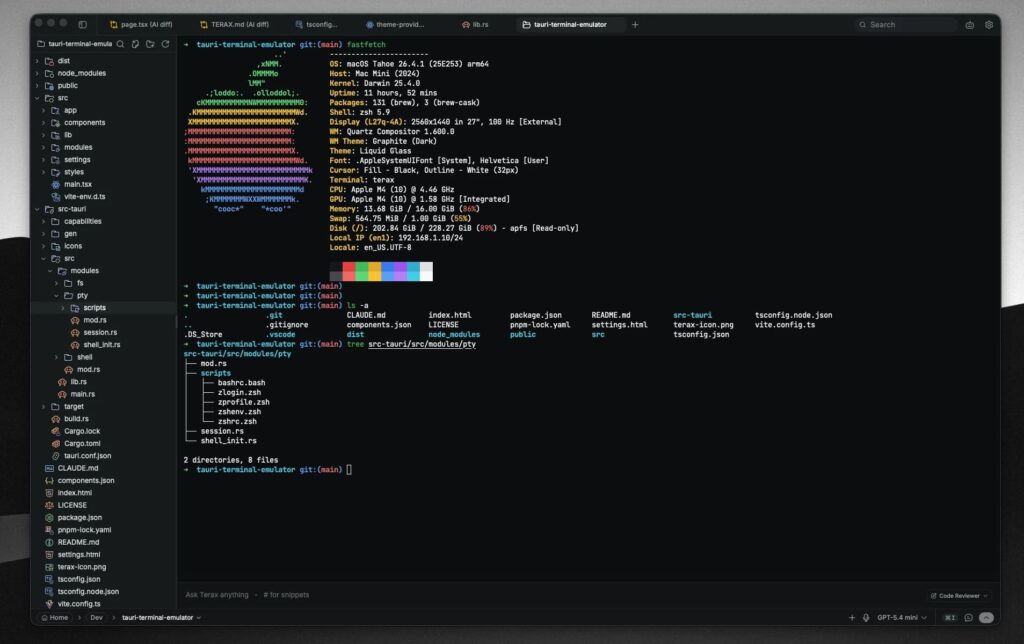
For years, the terminal was the place for people who preferred fast, simple and highly configurable tools. Then came AI-assisted development environments, more visual interfaces and platforms promising to turn the command line into a workspace for agents. Terax lands right between those two cultures: it aims to be as lightweight as a classic terminal, while integrating an editor, AI agents and web preview.
The project, which has started to attract attention among developers, presents itself as an “AI-native terminal” under 10 MB, with a cold start of around 300 ms, no telemetry, no mandatory account and an Apache 2.0 licence. The version currently published on its website is 0.7.1, still clearly in a maturing stage, but its proposal is already well defined: a terminal that does not force users to choose between speed, privacy and AI integration.
A lightweight terminal in the age of agentic development environments
The comparison with Alacritty and Warp is inevitable, although Terax does not play exactly the same role as either of them.
Alacritty has built a strong reputation among advanced users thanks to its performance, minimalist approach and integration with the rest of the system. It is a modern, cross-platform terminal based on OpenGL, with a clear philosophy: do the terminal part well and avoid reinventing everything else. Anyone who wants a multiplexer, editor, project management or AI has to compose their own environment with tmux, Neovim, shell scripts, extensions and external services.
Warp, by contrast, represents a much broader vision. The company defines it as an agentic development environment born from the terminal, with agent integration, cloud features, collaboration and a very polished user experience. Its own privacy documentation explains that the core terminal can work offline, that sign-in is optional and that cloud or AI features may involve sending information, with configurable controls for users and enterprise options.
Terax tries to occupy a different space. It does not want to be just a fast terminal or a cloud-based agent platform. Its bet is to package a terminal, editor, file explorer, AI panel, source control and web preview into a small application built with Tauri 2, Rust and React 19. According to its repository, it uses a native PTY backend with WebGL rendering, CodeMirror 6 as the editor and support for BYOK providers or local models via LM Studio, MLX or Ollama.
The idea is appealing for one specific reason: many developers want AI close to their code, but they do not always want everything to go through an external cloud, a corporate account or a heavy application. Terax allows users to connect their own keys for OpenAI, Anthropic, Gemini, Groq, xAI, Cerebras, OpenRouter, DeepSeek, Mistral or OpenAI-compatible endpoints. It also supports local inference, an increasingly relevant point as code privacy and token costs start to weigh more heavily on technical decisions.
What Terax offers compared with Alacritty and Warp
The biggest difference lies in the approach. Alacritty is a pure terminal. Warp is a terminal turned into a productivity and agent platform. Terax is closer to a small local development environment, designed for people who live in the terminal but want an editor, AI, git, search, files and preview close at hand without opening several applications.
| Tool | Main approach | Built-in AI | Privacy and data | Size / lightweight profile | Typical user |
|---|---|---|---|---|---|
| Alacritty | Fast and configurable terminal | No built-in AI | Local, depending on the rest of the stack | Very lightweight in use, with no IDE-style extras | Sysadmins, power users, tmux/Neovim users |
| Warp | Modern terminal with agents and cloud features | Yes, with agentic capabilities | Privacy controls; some cloud/AI features may send data depending on configuration | More complete and heavier than a classic terminal | Teams and developers who prioritise UX and integration |
| Terax | Lightweight terminal with editor, agents and preview | Yes, BYOK or local models | No account and no telemetry according to the project; keys stored in the system keychain | Under 10 MB, with a declared cold start of around 300 ms | Developers who want local or controlled AI without losing speed |
The most interesting part of Terax is not just its size. It is the workflow model. Agents can read files, plan tasks, run commands and propose changes, but edits are presented as reviewable diffs before touching disk. This fits a growing concern among developers: it is not enough for an agent to write code quickly; you need to review exactly what changed and accept or reject specific hunks.
Terax also introduces per-project memory through TERAX.md files, versionable configuration inside the repository, reusable snippets, slash commands, attachments from the file explorer and workflows with sub-agents. This is not an entirely new idea in AI-assisted development, but it is striking in such a small application with such a local-first orientation.
The built-in editor does not try to replace a full IDE either. It uses CodeMirror 6, supports popular languages such as TypeScript, JavaScript, Rust, Python, Go, C, C++, Java, HTML, CSS, JSON and Markdown, and includes Vim mode, prebuilt themes and AI autocomplete. For quick changes, diff review, small projects or agent sessions, it may be enough. For large codebases with advanced debugging, complex extensions and custom language servers, many developers will still prefer VS Code, JetBrains or a well-tuned Neovim setup.
Privacy, cost and control: why this type of tool matters
Terax arrives at a time when AI-assisted development is entering a more serious phase. Companies are starting to look at the real cost of tokens, code exposure to external services and the traceability of agent-generated changes. In that context, a tool that supports personal API keys or local models has a meaning that goes beyond technical curiosity.
The option to run local models through LM Studio, MLX or Ollama will not be enough for every case. Frontier models still offer better results in many complex tasks. But for autocomplete, simple reviews, command generation, small refactors or questions about a project, a local model can reduce costs and keep code inside the team.
There is also a broader reading around the return of lightweight native applications. Electron made it possible to build desktop tools quickly, but many technical users have spent years criticising its resource consumption. Tauri, Rust and native webviews have opened another path: modern interfaces with much smaller binaries. Terax follows exactly that direction. It is not the only project doing so, but it is one of the most visible examples applied to AI-powered terminals.
The main risk is the same one that accompanies many young projects: maturity. Version 0.7.1 suggests there is still room for bugs, interface changes, performance limitations or incomplete features. On Windows, the repository itself warns that the app is not code-signed yet and may show the “Windows protected your PC” warning on first launch. On Linux, there are specific notes for AppImage, FUSE and Wayland.
That is why Terax should not yet be read as “the definitive replacement” for Warp, Alacritty, VS Code or a tmux and Neovim-based stack. It is more useful to see it as a sign of where the development environment is moving: smaller tools, built-in AI, more local control and less dependence on a closed architecture.
For many teams, Warp will continue to make sense because of its experience, collaboration features and enterprise vision. For users who want pure performance, Alacritty will remain an excellent option. Terax enters the scene for those looking for something different: a terminal with agents and an editor, but without giving up a minimal, open-source application designed to keep the development workflow under the developer’s control.
The question is not whether Terax will replace established tools tomorrow. The question is why a 7 MB application can generate so much interest at a time when development environments keep getting larger. Perhaps the answer is simple: many developers want AI, but they do not want to lose the terminal that already feels like home.
Frequently asked questions
What is Terax?
Terax is an open-source AI-oriented development terminal. It integrates a terminal, editor, agents, file explorer, source control and web preview in a lightweight application.
Does Terax work with local models?
Yes. The project indicates support for local or offline models through LM Studio, MLX and Ollama, as well as BYOK providers and OpenAI-compatible endpoints.
Does Terax replace Warp or Alacritty?
It depends on the user profile. Alacritty remains a minimalist and fast terminal; Warp offers a broader agentic platform; Terax bets on a lightweight, local and open-source approach with built-in AI.
Is it ready for production use?
It can be used and tested, but the current version is still young. It should be evaluated carefully before adopting it as the main tool in critical teams.