
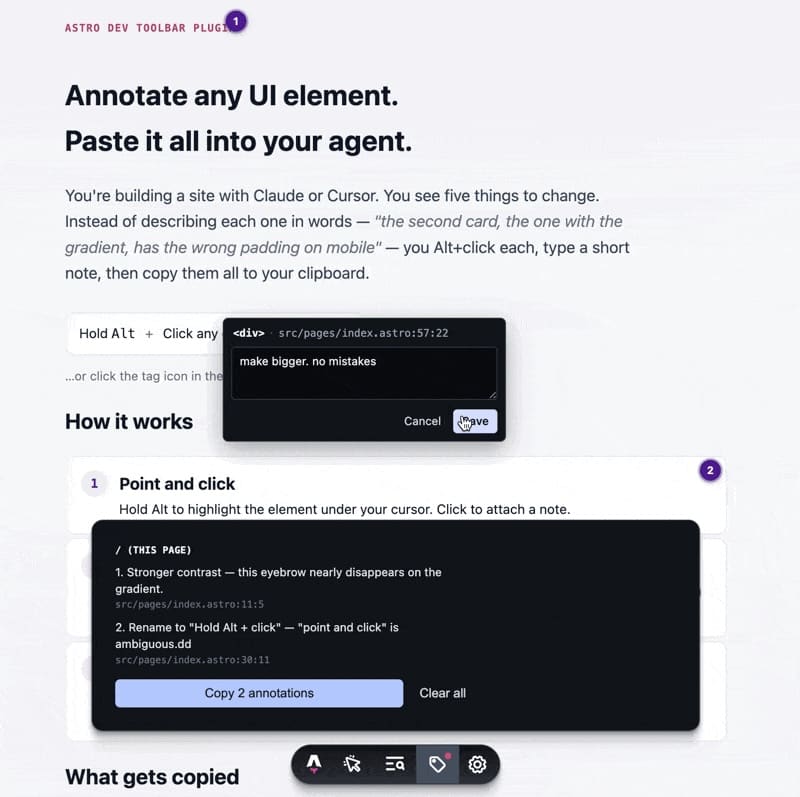
Working with coding agents has changed the way interfaces are built, but there is still a very everyday problem: clearly explaining which part of the screen needs to be changed. When a developer uses Claude Code, Cursor or any similar assistant, they often end up writing lengthy instructions to describe something that should be simple: “the second card on the pricing page”, “the button that appears on mobile under the hero section”, “the block with the gradient background that should look like the one on another route”.
Astro Agent Annotate tries to solve exactly that problem. The tool, published as an open source project by Robert van Hoesel, adds a utility to Astro’s development toolbar that allows developers to annotate elements directly on a page. The developer holds the Alt key, clicks on a UI element, writes a short note, and the tool saves that comment together with the exact component path and its position in the code.
The idea is simple, but it fits very well with AI-assisted development. Instead of manually describing where each change should happen, the developer can visually point to problematic elements, accumulate several notes across different routes and copy everything as Markdown to paste into Claude Code, Cursor or another agent. The result is much more precise context, with less ambiguity and less unnecessary token usage.
A small tool for a very real problem
Astro Agent Annotate works as an Astro Dev Toolbar plugin. It only runs during astro dev, so it does not affect the production build or add code to the published site. This decision matters because the tool is designed for the local development cycle, not for the end-user experience.
Installation is straightforward. The package is added as a development dependency and the integration is included in astro.config.mjs. From there, when running pnpm dev, a tag icon appears in Astro’s toolbar. Annotation mode can be activated by holding the Alt key or from the toolbar button itself, in a sticky mode that can be disabled with Esc or by clicking the icon again.
When the developer selects an element, the tool displays a note window next to the component. The header shows the source path, for example src/components/Hero.astro:42:6. After saving, a small bubble remains on the element. That bubble can be reopened to edit or delete the annotation, and it remains available even if the page reloads.
The utility is not limited to a single screen. Annotations are stored in localStorage by route, so developers can mark elements on the homepage, move to a pricing page, add more notes and then copy the whole set from the toolbar. The output format is Markdown, grouped by page, with each comment, its source file and a reference to the HTML fragment when available.
| Feature | What it gives the developer |
|---|---|
| Alt + click on an element | Allows developers to visually indicate where the agent should act |
| Note linked to the component | Reduces long and ambiguous explanations |
File.astro:line:col path | Gives the agent a direct reference to the code |
| Persistent bubbles | Keeps feedback available between reloads |
| Route-based annotations | Allows changes from several pages to be gathered together |
| Markdown export | Makes it easy to paste context into Claude Code or Cursor |
Only in astro dev | Does not affect the production site |
Why it fits Claude Code and Cursor
The value of Astro Agent Annotate is easier to understand in a real workflow. A developer reviews a page and spots several adjustments: the main button should be more visible on mobile, a card needs more spacing, the pricing block should inherit a background used on another page, and secondary text has poor contrast. Without this tool, they would need to explain each point in natural language, with enough detail for the agent to find the right file.
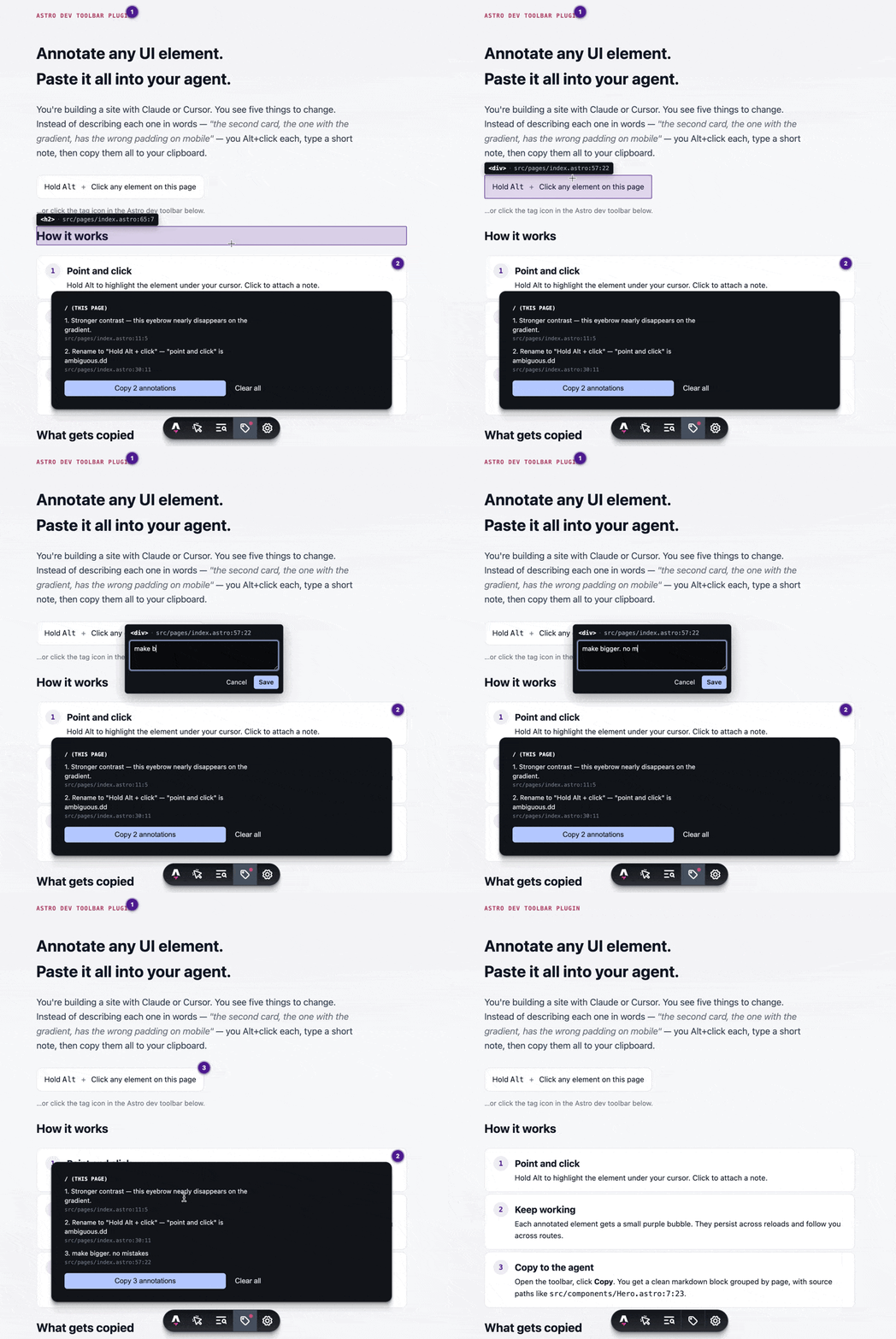
With Astro Agent Annotate, the process changes. The developer clicks on each element, writes a short note and copies all annotations. The agent receives not only the request, but also the component path and the element context. This reduces the margin for error, especially in projects with many reused components or complex layout structures.
For system administrators and programmers who are bringing AI into their daily workflow, this type of tool offers something more valuable than a simple convenience. It reduces the time between detecting a visual issue and turning it into an executable task for the agent. It also helps with batch work: a whole page can be reviewed, everything that needs changing can be annotated, and Claude Code or Cursor can then be asked to apply the changes in one go while maintaining consistency across components.
The case shared on Reddit by a user from the Astro community illustrates that usefulness well. After trying the tool during a work session, the user explained that it sped up visual adjustments on a page because they no longer had to manually describe every area. They also highlighted a practical detail: because notes persist across several pages, they were able to mark a background on a source route and ask the agent to apply it to another page. Claude Code understood the relationship and applied the change quickly.
That kind of workflow is becoming increasingly common. The developer does not expect the AI to guess the entire intent; they give it more precise signals. The tool turns the interface into a communication layer with the agent. Instead of writing “the block at the top right”, the developer points to the actual block and adds a specific instruction.
Fewer tokens, fewer errors and better context
One of the hidden costs of development with agents is poorly described context. If the instruction is imprecise, the agent may edit the wrong component, change a global style that should not have been touched, or apply a solution that is too broad. Then the developer has to review, correct and explain the problem again. That repetition consumes time and tokens.
Astro Agent Annotate does not remove the need for human review, but it improves the quality of the input. The agent receives notes that are closer to the code, with a specific location and grouped in a readable format. This is especially useful in Astro, where a page may combine .astro components, islands using frameworks such as React or Vue, local styles, shared layouts and content coming from Markdown or a CMS.
The tool also uses internal attributes exposed by Astro during development to identify the source file. According to its documentation, it uses a Vite plugin to make paths relative and a MutationObserver to capture attributes such as data-astro-source-file and data-astro-source-loc before other audit tools can remove them from the DOM. The practical result is that the user sees clean project paths instead of absolute local system paths.
From a technical point of view, it is also interesting that the annotation UI lives inside shadow roots, so the page’s styles do not interfere with the popups, bubbles and overlays. The bubbles are repositioned using requestAnimationFrame, which helps them stay anchored to the element even when there are layout changes or responsive adjustments.
This is not a tool for every web project. Its scope is Astro. It also does not replace visual tests, design review, Storybook, Playwright screenshots or formal QA systems. Its strength lies in fine-tuning work with agents: reviewing an interface, annotating changes and giving the AI a much clearer package of instructions than a written explanation from scratch.
For small teams, it can be a quick way to speed up iterations. For larger teams, it could act as a bridge between visual review and technical execution, although it would need to fit into existing processes. Not every annotation should automatically become a change; some will require design, accessibility or performance criteria.
A sign of where agent tooling is heading
Astro Agent Annotate is part of a broader trend: development tools are starting to adapt not only to human developers, but also to AI agents. For years, development environments were designed for a person to navigate files, inspect the DOM, review logs and write changes. Now a new layer is appearing: how to transmit intent to an agent efficiently and verifiably.
In that context, a visual annotation with a file reference can be more useful than a long prompt. The important thing is not only asking “improve this section”, but saying exactly which section, on which page, with what problem and where the code that probably needs to be changed is located. The better that signal is, the easier it is for the agent to produce an acceptable result on the first pass.
There is also a lesson here for those who manage projects and development environments. The use of AI does not depend only on the chosen model. It depends on the whole workflow: how context is captured, how changes are formulated, how they are reviewed, how they are versioned and how the agent is prevented from operating blindly. Small tools like this can reduce a meaningful part of the daily friction.
Astro Agent Annotate does not promise to automate design or replace the developer. Its contribution is more concrete and, precisely for that reason, more interesting: it turns visual observations into structured instructions for an agent. In web development, where much of the work involves adjusting details, comparing components and maintaining consistency between pages, that improvement can save many cycles.
AI-assisted development will not advance only through larger models. It will also need better interfaces between human judgment and automated execution. In Astro projects, this utility points in a clear direction: point, annotate, copy and let the agent work with real context.
Frequently asked questions
What is Astro Agent Annotate?
Astro Agent Annotate is a plugin for the Astro Dev Toolbar that allows developers to annotate page elements directly and copy those notes as Markdown for use with agents such as Claude Code or Cursor.
Does it affect the production site?
No. The tool only runs during astro dev, so it does not add functionality to the production build and does not appear for end users.
What information does it copy for the agent?
It copies notes grouped by page, together with the component path and the approximate position in the file, such as src/components/Foo.astro:42:6. It may also include a reference to the HTML element.
What kind of work is it most useful for?
It is especially useful for visual adjustments, interface changes, component review, responsive improvements and tasks where the developer needs to indicate precisely which element the agent should modify.