
Proxmox VE 9.2 arrives with a clear message: a cluster can no longer be just a group of nodes where administrators manually place virtual machines and containers. In development, testing, CI/CD, internal platforms and lightweight production environments, the virtualization layer has become part of the daily workflow for sysadmins, DevOps teams and developers who need to spin up services, isolate environments, validate deployments and keep infrastructure under control without relying exclusively on large proprietary platforms.
The new version, officially released on 21 May 2026, introduces a Dynamic Load Balancer, expands software-defined networking capabilities, adds GUI-based management of custom CPU models and includes new options for handling high availability during planned maintenance. Proxmox describes the release as focused on platform refinement, stability, resource efficiency and better operational control.
The cluster starts making decisions with more context
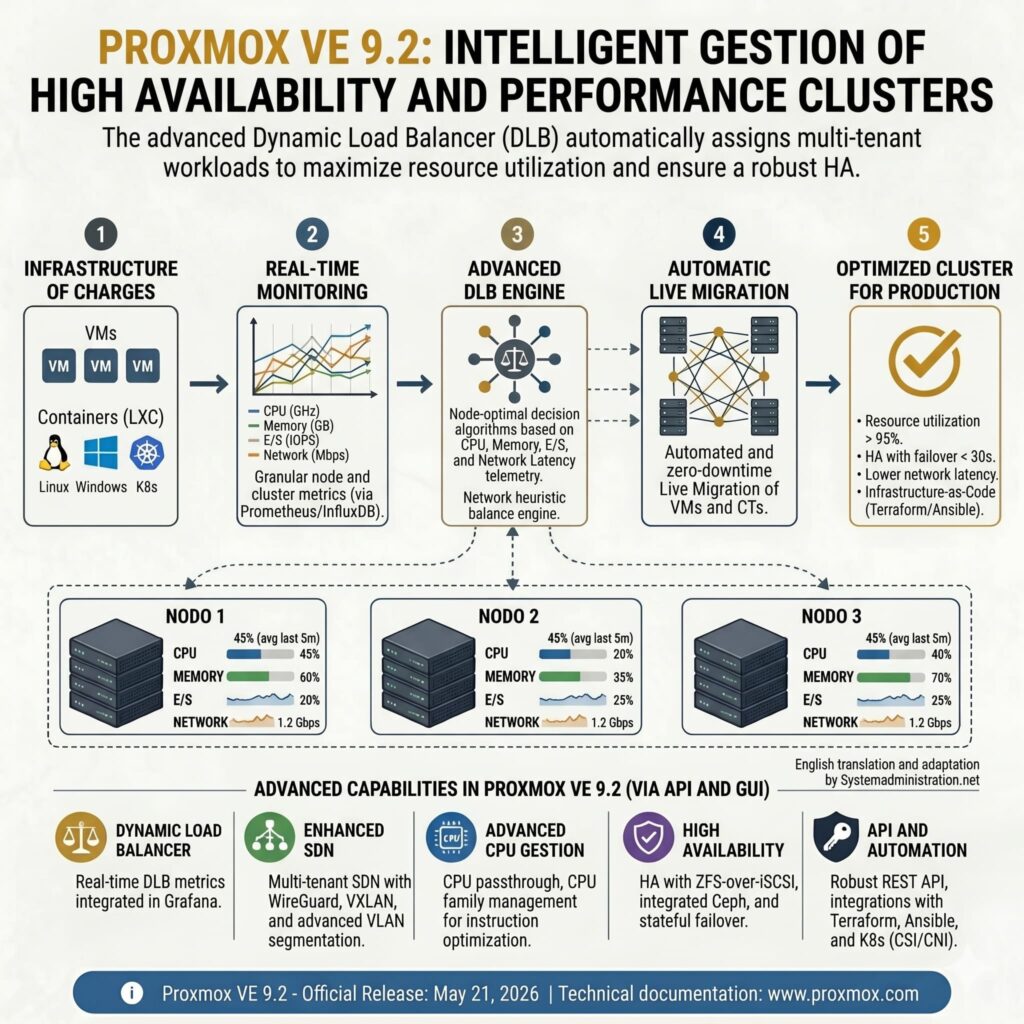
The most visible addition is the new Dynamic Load Balancer. Until now, many Proxmox administrators had to keep a close manual eye on how workloads were distributed across cluster nodes. A CPU-hungry virtual machine, several LXC containers on the same physical host or the gradual accumulation of small services could easily lead to an unbalanced cluster: one node under pressure while others still had capacity available.
Proxmox VE 9.2 addresses this through the Cluster Resource Scheduler. In its new dynamic mode, the scheduler uses real usage metrics from nodes and guest workloads to improve the placement of VMs and containers. The load balancer can also automatically migrate workloads managed by the high availability stack in order to reduce imbalance between nodes, while still respecting the HA rules defined by administrators.
For technical teams, this has several practical implications. The first is obvious: less manual intervention when the cluster starts to grow. The second is more relevant for organizations using Proxmox as the foundation for internal platforms: a more balanced environment makes infrastructure more predictable, which matters when running CI/CD runners, staging environments, security labs, test databases or internal developer services.
The load balancer does not remove the need for proper sizing. It does not magically turn a small cluster into a public cloud. If there is not enough CPU, memory, storage or network capacity, the underlying problem remains. But it does help make better use of available resources and reduces the risk of workload placement decisions made months earlier becoming a long-term operational burden.
| Proxmox VE 9.2 change | Why it matters for technical teams |
|---|---|
| Dynamic Load Balancer | Improves HA workload distribution across cluster nodes |
| SDN with WireGuard | Enables secure network fabrics and isolated environments |
| BGP/EVPN route maps and prefix lists | Adds finer control for complex and multi-tenant networks |
| GUI-based custom CPU models | Helps manage compatibility between hosts and migrations |
| HA arm/disarm | Reduces unwanted actions during planned maintenance |
| UEFI 2023 via GUI/API | Improves support for modern Windows and secure boot scenarios |
| Debian 13.5, QEMU 11.0, LXC 7.0 and ZFS 2.4 | Updates the core stack used by VMs and containers |
More software-defined networking for real-world environments
The other major area of improvement is SDN. Proxmox VE 9.2 adds native support for WireGuard and BGP as fabric protocols within its software-defined networking stack. It also introduces more precise BGP/EVPN filtering through route maps and prefix lists, along with route redistribution for OSPF fabrics, additional EVPN controller options and IPv6 underlay support for EVPN.
For an advanced homelab user, some of these features may look excessive. For teams operating labs, internal services or multi-tenant platforms, they are exactly the kind of capabilities that make a difference. WireGuard enables secure tunnels with a cleaner configuration model than many traditional alternatives. BGP and EVPN help build more flexible networks, especially when there are multiple segments, isolated traffic domains, external routers or automation requirements.
This brings Proxmox closer to conversations that were often reserved for more expensive platforms or complex cloud deployments. Not because Proxmox is trying to replace Kubernetes or a full public cloud stack, but because many organizations are looking for an open source virtualization layer that can coexist with modern networking, distributed storage and automation.
For developers, the impact can be seen in concrete use cases: customer-isolated test environments, lab networks for validating architectures, internal clusters for product teams or disposable VMs for testing new releases without touching production. Networking becomes less of a rigid block and more of a configurable part of the platform.
CPU, HA and maintenance: fewer surprises in production
Proxmox VE 9.2 also improves the management of custom CPU models from the web interface. Administrators can create, edit and delete CPU profiles from the Datacenter section, with a flag selector that shows compatibility across cluster nodes. This has clear operational value: avoiding migration issues, standardizing CPU profiles and controlling which capabilities are exposed to specific virtual machines.
In development environments this may sound like a minor detail, but it becomes important when working with nodes from different hardware generations or workloads that depend on specific CPU instructions. A VM that runs perfectly on one host may fail to migrate cleanly to another if there are relevant CPU differences. Having clearer CPU model management in the GUI reduces friction and makes such operations easier to review.
The new HA arm/disarm function follows the same logic. During planned maintenance, administrators can temporarily disarm the high availability stack at cluster level to prevent unwanted automatic actions, such as fencing, and then re-enable it while preserving the state of HA resources. In production, this helps ensure that a planned intervention is not interpreted by the platform as an actual failure.
The technical base has also been updated. Proxmox VE 9.2 is built on Debian 13.5 “Trixie”, ships with Linux kernel 7.0 as the new stable default and includes QEMU 11.0, LXC 7.0 and ZFS 2.4. On the storage side, Ceph Tentacle 20.2.1 becomes the new default stable release, while Ceph Squid 19.2.3 remains available as an option.
For teams running Ceph, the upgrade path deserves special attention. Proxmox warns that moving from Proxmox VE 8.4 with Ceph Reef to Proxmox VE 9.2 with Ceph Squid or Tentacle is a multi-step process. First, Ceph must be upgraded from Reef to Squid while still on Proxmox VE 8.4. Then Proxmox VE can be upgraded from 8.4 to 9.2. Finally, Ceph can be moved from Squid to Tentacle if required.
That warning captures the right mindset for this release. Proxmox VE 9.2 is attractive, but production environments should not treat it as a casual update. For labs, development environments or secondary clusters, it is a good opportunity to test the Dynamic Load Balancer, WireGuard SDN and the updated technical stack. For production, the sensible approach is to review compatibility, validate backups, test migrations and plan a proper maintenance window.
There is no need to rush. Proxmox VE 8.4 will continue receiving security updates and critical bug fixes until August 2026, giving organizations time to prepare the transition properly.
Proxmox VE 9.2 does not change the nature of the platform. It remains an open source virtualization solution built around KVM, LXC containers, software-defined storage and web-based management. What changes is its operational ambition. The cluster becomes more aware of its own state, networking gains serious options for modern architectures and administrators get better tools to reduce repetitive work.
For developers and technical teams, the message is clear: Proxmox is no longer just a cost-effective way to run VMs. It is increasingly becoming an infrastructure foundation for development environments, internal platforms, reproducible labs and production services where control over the stack still matters.
Frequently asked questions
What does the Dynamic Load Balancer add to Proxmox VE 9.2?
The Dynamic Load Balancer allows the cluster to use real metrics from nodes and workloads to improve the placement of HA-managed VMs and containers. Its goal is to reduce imbalance and make better use of available resources.
Is Proxmox VE 9.2 relevant for developers?
Yes. It is especially useful for teams using Proxmox for labs, staging environments, CI/CD runners, software testing, isolated networks or internal platforms. The improvements in SDN, CPU management and workload balancing make those environments more flexible.
Can Proxmox VE 8 be upgraded to Proxmox VE 9.2?
Yes, Proxmox says upgrading from the latest Proxmox VE 8 release is possible by following the official upgrade documentation. In production, teams should test first, review storage compatibility and make sure backups are verified.
What should Ceph users consider before upgrading?
Moving from Proxmox VE 8.4 with Ceph Reef to Proxmox VE 9.2 with Ceph Squid or Tentacle requires several steps. Proxmox recommends following the official upgrade documentation carefully to avoid issues.