
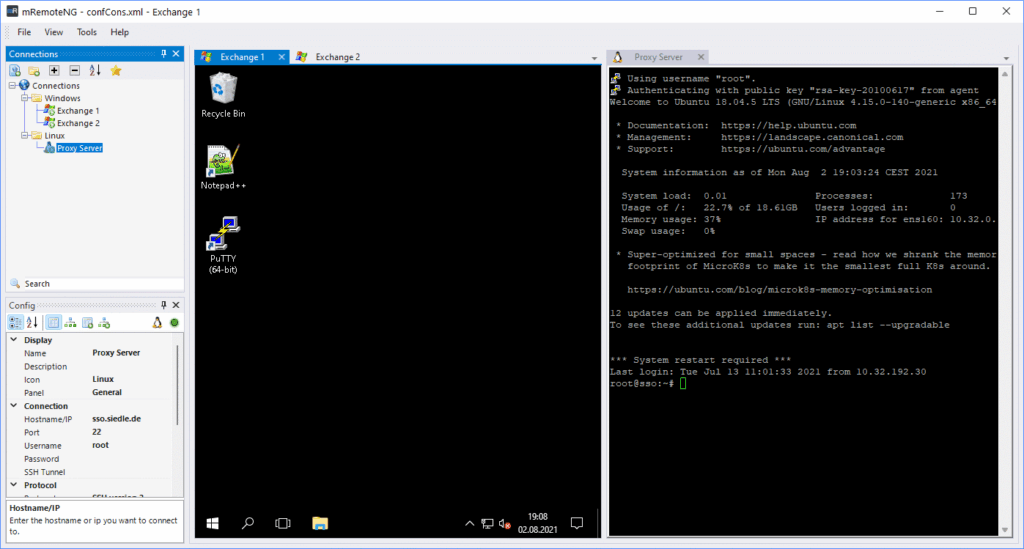
mRemoteNG remains a useful tool for system administrators who work with dozens or even hundreds of servers every day. Its proposition is straightforward: centralize RDP, SSH, VNC and other remote connections in a single tabbed application, organize systems into groups, and reduce the need to keep multiple clients open. It is open source, distributed under the GPL-2.0 license, and development continues, although it is important to distinguish between its older stable release and newer test builds.
mRemoteNG in 20 seconds
- Centralizes RDP, SSH, VNC, Telnet, HTTP/HTTPS, rlogin and PowerShell Remoting connections, among others.
- It is primarily designed for administrators working from Windows.
- Servers can be organized by environment, project or function, with reusable and inherited settings.
- It is available as an MSI installer or portable ZIP and can also be installed with
wingeton Windows 11. - The 1.78.2 development branch also includes several security fixes.
mRemoteNG is not a new tool. In fact, it has been used by system administrators and infrastructure professionals for many years. That longevity can also make it easy to overlook for people who have entered the industry more recently or built their toolkit around newer applications.
Its usefulness quickly becomes apparent in a common infrastructure scenario: several Windows servers managed through Remote Desktop Protocol (RDP), Linux machines accessed through Secure Shell (SSH), some VNC systems, and separate development, production and lab environments.
Instead of keeping IP addresses, usernames and connection settings scattered across different applications, mRemoteNG provides a common interface for organizing and accessing them.
One Console for RDP, SSH, VNC and Other Protocols
mRemoteNG can essentially be described as an open source, tabbed, multi-protocol remote connection manager.
According to the current project documentation, it supports RDP, VNC, SSH, Telnet, HTTP/HTTPS, rlogin, raw socket connections, PowerShell Remoting and AnyDesk.
This makes it possible to maintain an infrastructure structure such as:
INFRASTRUCTURE
│
├── Production
│   ├── WEB-01          SSH
│   ├── WEB-02          SSH
│   ├── SQL-01          RDP
│   └── AD-01           RDP
│
├── Development
│   ├── DEV-LINUX       SSH
│   └── DEV-WINDOWS     RDP
│
└── Networking
    ├── Router          SSH
    └── Appliance       HTTPS
The advantage goes beyond simply opening connections. The application lets administrators structure them into folders and use inherited properties.
For example, an administrator can define certain parameters at container level and allow connections underneath it to inherit part of that configuration. In relatively large infrastructures, this reduces repetitive work and makes the operational inventory easier to maintain.
Sessions are also displayed as tabs inside the same application. For administrators simultaneously managing several Windows and Linux servers, this avoids ending up with a desktop filled with RDP windows, SSH terminals and separate management tools.
Installation with MSI, Portable ZIP or Winget
mRemoteNG is designed for Windows. The project currently lists support for Windows 11, Windows 10 and Windows 8.1, as well as Windows Server 2012 R2, 2016, 2019 and 2022.
It can be downloaded as an MSI installer or used as a portable application through a ZIP package.
On Windows 11, there is an especially convenient alternative:
winget install -e --id mRemoteNG.mRemoteNGCode language: CSS (css)This can also make mRemoteNG easier to incorporate into automated workstation deployment procedures.
Current repository requirements include Microsoft .NET Desktop Runtime and the appropriate Microsoft Visual C++ Redistributable. Administrators should check the requirements of the specific build before deploying it broadly across an organization.
The portable edition has another useful advantage for labs or technical teams: it can run without a conventional installation and can be removed simply by deleting its directory.
SFTP, SCP, SSH Tunnels and External Tools
mRemoteNG is not limited to displaying remote desktops and terminals.
Its SSH File Transfer functionality can perform transfers using SFTP or SCP over an encrypted connection. Administrators can specify the server, port, credentials, local file and remote destination from the tool.
It also supports SSH tunnels. An SSH connection can be configured as a tunnel server to reach another destination, which can be useful when certain systems are only accessible through a bastion host or intermediate server.
Another useful component is support for external tools.
mRemoteNG can launch other applications and pass variables from the selected connection, including:
%HOSTNAME%
%PORT%
%USERNAME%
%PASSWORD%
%DOMAIN%
This makes it possible to integrate utilities such as WinSCP, FileZilla, PowerShell, traceroute and other tools commonly used by administrators.
As a result, mRemoteNG can serve as a central entry point for a significant part of a system administrator’s daily toolkit.
It Can Also Import Systems from Active Directory
When an infrastructure contains many systems, manually entering every server quickly becomes impractical.
mRemoteNG provides several import mechanisms. Its documentation covers XML and CSV files, but also the ability to import computers directly from an Active Directory organizational unit. Subordinate organizational units can also be included.
There is also an option to import connections from a port scan using Nmap.
These capabilities help explain why an apparently simple application can remain useful for IT departments managing heterogeneous infrastructure.
Stable Releases and Newer mRemoteNG Builds
There is an important distinction to make regarding the project’s version numbering.
Version 1.77.3 has been used for years as the stable reference, while development has continued through newer builds.
GitHub lists mRemoteNG 1.78.2 NB 3405 as a pre-release published on February 22, 2026.
It should therefore not be presented as a new stable release.
The 1.78.2 branch is nevertheless particularly interesting because its changelog includes several security fixes covering issues related to SQL injection, possible command injection, XML External Entity (XXE) processing and path traversal. It also adds HTTPS as a protocol, HTTP/S basic authentication and RDP file importing.
For corporate environments, the distinction between stable and development versions matters. Being open source does not mean every new build should automatically be deployed into production. New releases should first be tested and evaluated according to the organization’s update and security policies.
The Most Sensitive Area: Credentials
Centralizing connections also means centralizing sensitive information.
A tool that knows server addresses, IPs, usernames and potentially passwords becomes part of the infrastructure’s security surface.
For that reason, mRemoteNG should not be confused with a complete Privileged Access Management (PAM) platform.
Its documentation includes integration with an external credential store, specifically Thycotic Secret Server for RDP and SSH connections. Under this model, credentials can be retrieved from the vault when the connection is established rather than being stored directly on disk. The documentation highlights benefits such as security, auditing and password rotation.
In a corporate environment, this type of approach is preferable to turning a local connection file into a general repository for privileged credentials.
Organizations should also apply least-privilege principles, secure the workstation from which infrastructure is administered, and avoid sharing configuration files that may contain sensitive information.
mRemoteNG vs a Conventional SSH Client
The value of mRemoteNG becomes clearer when compared with an SSH-only tool.
An administrator working exclusively with Linux can probably handle most tasks using OpenSSH, a good terminal and a few complementary utilities.
mRemoteNG becomes more interesting when the infrastructure is hybrid.
The same engineer may need to connect through RDP to a Windows server, open SSH sessions to several Linux machines, access an HTTPS management interface, use VNC on another system and launch an external utility against a particular address.
That is where tabbed sessions, connection groups and reusable configurations can save time.
It can also be useful for IT departments that still operate a large Windows Server estate while increasingly introducing Linux systems, appliances and other platforms.
It does not replace automation. If an operation must be performed across 200 servers, PowerShell, Ansible or another automation platform will usually be the better approach rather than opening 200 tabs.
mRemoteNG solves a different problem: organizing and simplifying interactive access to remote systems.
And despite having been available for many years, it can still make sense in 2026 precisely because the problem it addresses has not disappeared.
Frequently Asked Questions
What is mRemoteNG?
mRemoteNG is an open source remote connection manager for Windows. It lets administrators organize and open RDP, SSH, VNC, Telnet, HTTP/HTTPS, PowerShell Remoting and other connections from a single interface.
Is mRemoteNG free?
Yes. mRemoteNG is open source and distributed under the GPL-2.0 license. The project accepts donations to help cover development and maintenance costs.
What is the latest version of mRemoteNG?
GitHub lists mRemoteNG 1.78.2 NB 3405, published on February 22, 2026, as a pre-release. It is therefore important to distinguish these newer test builds from releases considered stable.
Does mRemoteNG replace a PAM platform?
No. It can centralize remote connections and provides credential-related functionality, but it should not be treated as an enterprise Privileged Access Management platform. Sensitive environments should combine connection management with appropriate credential protection, access control and auditing policies.