
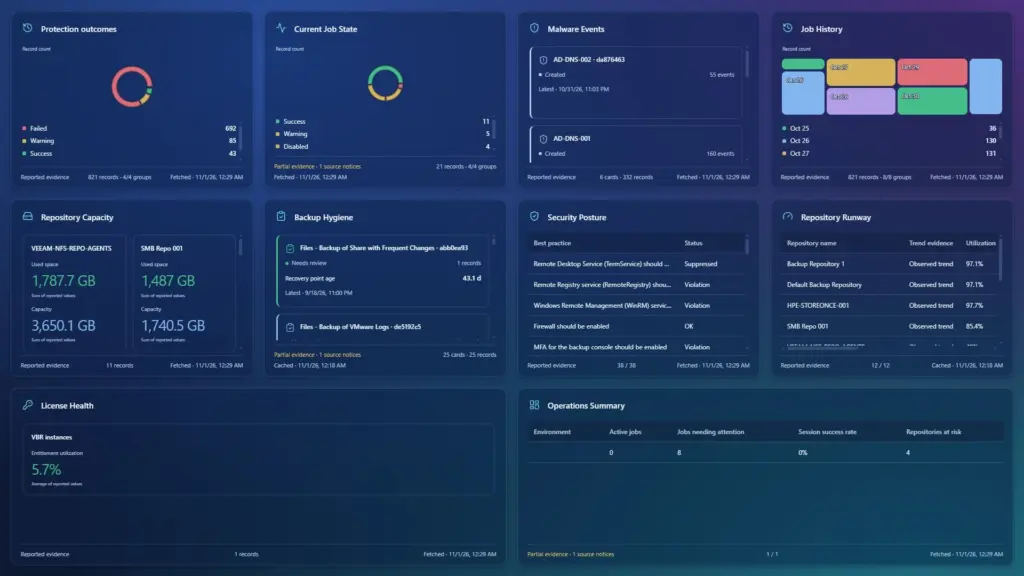
Jorge de la Cruz has released Open Backup UI v1.0.1, an update to his open-source web console for Veeam environments that adds Kiosk Builder, a canvas where administrators design their own dashboards from Veeam Backup & Replication (VBR) data and publish them as read-only screens. The release, announced around Halloween, also brings repository capacity forecasts and PDF export for AI-generated health summaries.
Key points on Open Backup UI v1.0.1 in 30 seconds
- Open Backup UI is an independent, MIT-licensed community project by Jorge de la Cruz, not endorsed or supported by Veeam, and requires licensed Veeam products.
- Kiosk Builder, still in Labs, offers 16 VBR data sources and 10 visualization types.
- Dashboards can be shared as read-only links with optional passwords, automatic refresh and a full-screen TV mode.
- Version 1.0.1 also adds repository capacity forecasts over 30, 60 or 90 days and PDF export for AI-generated health summaries.
The project is a personal, community effort: it is not an official Veeam product, comes as-is with no support or service levels, and the GitHub repository recommends testing it in a lab first and not pointing it at production systems without a security review. It also requires valid, properly licensed Veeam products. Writing on LinkedIn, the author says the v1.0.0 announcement passed 10,200 impressions, and frames v1.0.1 as a treat for the community.
What Open Backup UI does
It is a TypeScript web application built on Next.js 15, shadcn/ui and Tailwind CSS that pulls data from several Veeam tools through their REST APIs into one console: Veeam Backup & Replication (port 9419 by default), Veeam Backup for Microsoft 365 (4443), Veeam ONE and Veeam Recovery Orchestrator. It offers a dashboard with active jobs, success rate, storage and malware events, job tables with session history, proxy, repository and managed server views, a VM inventory for vSphere, Hyper-V and Nutanix AHV, and a recovery point objective (RPO) map of protected data.
It needs Node.js 20 or later and runs with npm install and npm run dev for testing, or npm run build and npm start for a stable deployment; the repository also ships a Dockerfile and a container guide. Data sources are configured from the interface, with credentials stored locally under AES-256 encryption, and a server-side proxy keeps them away from the browser. Teams moving workloads off VMware may also want to read where Veeam fits in a VMware-to-Proxmox migration.
Kiosk Builder: dashboards built around your questions
The headline feature is switched off by default and lives under Administration → Settings → Labs. On an empty canvas, the administrator draws a rectangle, picks a data source and chooses how to show it. The release notes list 16 VBR sources, including protected data and objects, job history and current job state, malware events, repository capacity, security posture, retention evidence, backup hygiene, proxies, managed servers and license health. Ten visualizations are available: object grid, table, donut, pie, bar, line, time series, KPI, mosaic and radar.
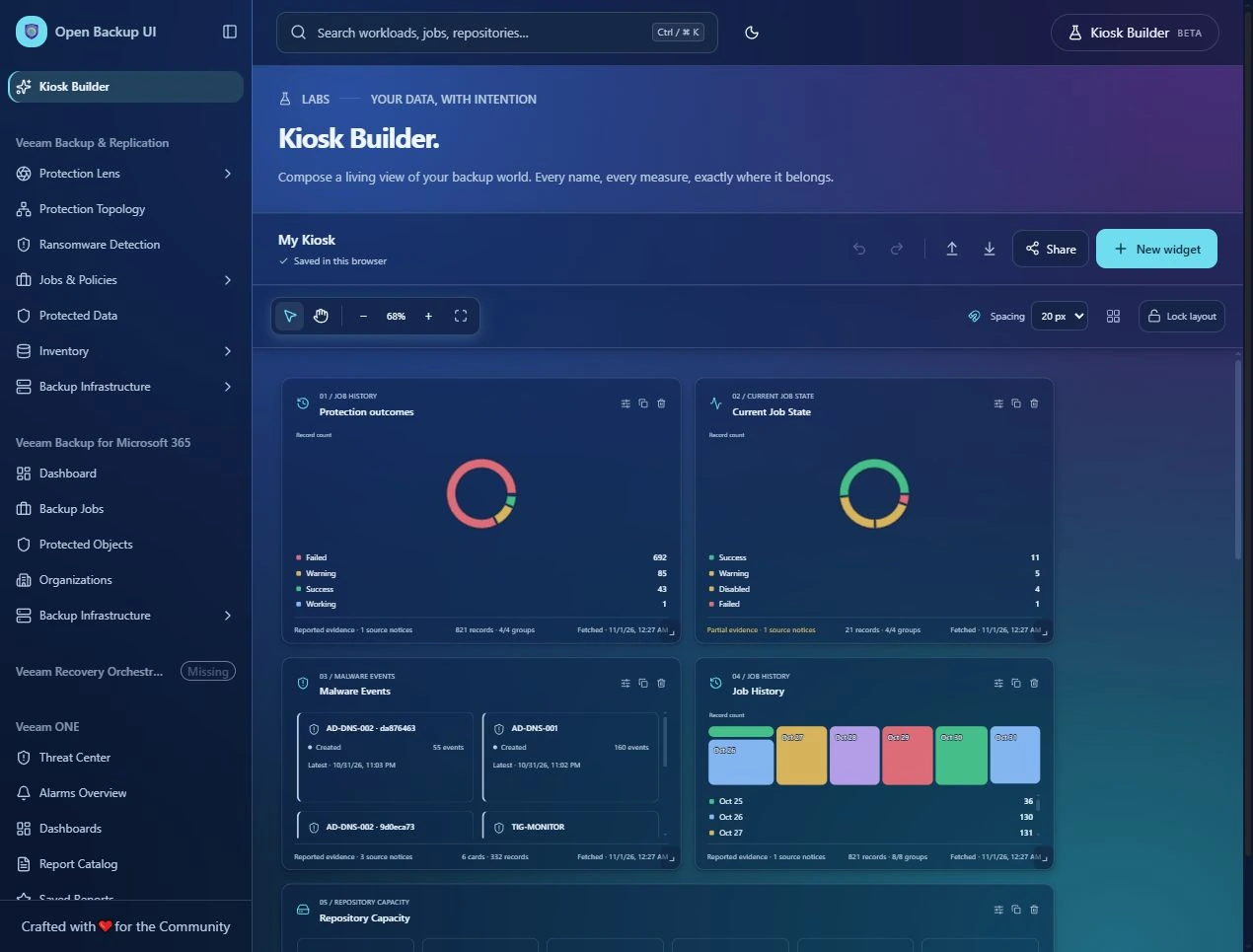
Widgets can be fine-tuned to show repository names next to capacity values, give each job its own series, rename or hide labels and columns, or filter the records behind them. Moving or resizing a widget pushes neighbours aside while keeping the spacing, and the editor has guides, zoom and undo. Layouts are saved per browser and per VBR server, and can be exported as JSON without backup records or credentials.
A finished dashboard can be published as a read-only link, optionally password-protected, refreshing every 30 seconds or every 1, 2, 5 or 10 minutes. TV mode fits the widgets to the screen and fades the controls when idle. To separate the viewer from the console, the KIOSK_PUBLIC_ORIGIN variable and npm run start:kiosk expose only the shared routes. The author is explicit about the limits: the viewer adds no login, shared fields are not anonymized and the full link acts as a credential, so it is worth reviewing what is shared and serving it over HTTPS behind network controls.
Capacity forecasts, AI summaries and upgrading
Capacity Forecast projects a repository’s usage over 30, 60 or 90 days, based on recorded volume usage or a retention scenario. Widgets read cached data and keep their collection timestamps visible, and the project notes that forecasts are advisory. AI health summaries now follow the console design, explain provider failures such as Gemini credit errors, and can be exported to a PDF with a cover, linked contents and fonts for the app’s eleven languages, in A4 or US Letter, without another AI request. The notes point out that generating a summary sends environment context to the configured provider.
Before upgrading, the author recommends backing up the persistent data/ directory and its encryption key, then running npm ci and rebuilding. According to the notes, the release passed 995 local tests and the production dependency audit found no advisories, while the full development tree has 14 moderate ones. For now, Kiosk Builder only covers VBR sources; Microsoft 365 and Veeam ONE are not yet included.
Frequently asked questions
What is Open Backup UI?
An open-source, MIT-licensed web console that brings together data from Veeam Backup & Replication, Veeam Backup for Microsoft 365, Veeam ONE and Veeam Recovery Orchestrator through their REST APIs.
Is Open Backup UI an official Veeam product?
No. It is an independent community project, not endorsed or supported by Veeam, and it requires properly licensed Veeam products.
What is new in v1.0.1?
Kiosk Builder for designing and publishing read-only dashboards, repository capacity forecasts and PDF export for AI summaries.
Is it safe to publish a kiosk?
The viewer adds no login and the link acts as a credential, so the author advises reviewing shared fields and using HTTPS and network controls.
Sources: